Backup & Recovery
- Home
- Backup & Recovery
Backup and Recovery
When Ransomware Strikes, Be Back Online Before the Day Is Over
Automated, encrypted backups stored locally and in the cloud — so your school or agency recovers in hours, not months.
- Dedicated Cybersecurity Advisor
- No Long-Term Contracts
- Built for Schools and Public Agencies
A ransomware attack does not just encrypt your files — it shuts down your classrooms, payroll, student or employees records, and operations. Recovery without the right backup strategy takes months.
92%
Spike in K-12 ransomware attacks in 2024
"Education is one of the most targeted sectors — and school networks are frequently among the least protected."
Source: ThreatDown by Malwarebytes / Sophos State of Ransomware in Education 2024

$3.76M
Average recovery cost after a ransomware incident
"Recovery costs for K-12 organizations more than doubled from 2023 to 2024 — and that's before any ransom payment."
Source: ThreatDown by Malwarebytes / Sophos State of Ransomware in Education 2024

96%
Of schools restore from backup rather than pay
"Organizations with immutable backups recovered without paying ransom."
Source: Sophos State of Ransomware in Education 2024

Ransomware payments from K-12 schools and public agencies reached record levels in 2023. In many cases, organizations paid simply because their backups were incomplete, outdated, or stored on the same compromised network. Without a tested, offsite backup strategy, your data is one attack away from permanent loss.
Enterprise-Grade Backup Built for Schools and Public Agencies
Servers, workstations, and cloud data are protected with a layered backup strategy — locally, off-site, and in the cloud.
Local and Cloud Backup
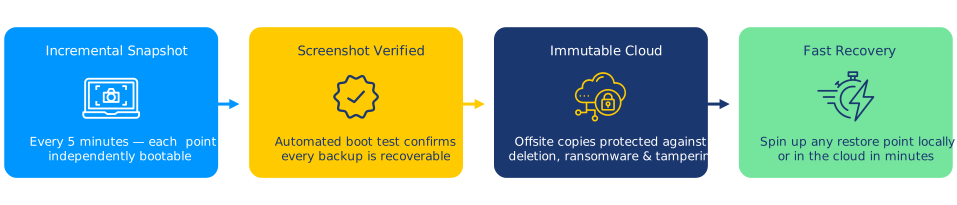
The solution follows the 3-2-1 backup rule: three copies of your data, on two types of media, with one copy stored off-site in secure cloud storage. Local backups enable fast recovery; cloud backups protect against physical disasters.

Instant Virtualization
If your server fails or is encrypted by ransomware, it can be spun up as a virtual machine within minutes — keeping critical systems running while full recovery proceeds in the background.
Immutable, Ransomware-Proof Storage
Cloud backups are stored in immutable format — meaning ransomware cannot encrypt or delete them even if your network is fully compromised. Your recovery point is always protected.
Automated Backup Verification
Every backup is automatically tested for recoverability. Screenshot verification confirms your backup is clean and usable before you ever need it — eliminating the risk of discovering a corrupted backup during a crisis.

AI-Powered
Intelligent Backup and Recovery, Powered by AI
The backup platform uses AI to catch threats early, verify recoverability automatically, and ensure your data is always protected.
- Anomaly detection that flags unusual backup patterns — a common early sign of ransomware activity
- Automated screenshot verification confirms every backup is clean and ready to restore
- Intelligent retention policies that balance storage costs with compliance and recovery requirements
- Predictive alerts that identify storage capacity issues before backups fail
A Perfect Fit for Schools and Public Entities.
ResoluteGuard Cybersecurity tools are designed for your budget, your team size, and your compliance requirements.
Recovery Time That Fits Your Schedule
Your Recovery Time Objective (RTO) and Recovery Point Objective (RPO) are defined in collaboration with your leadership team — and the backup solution is engineered to meet them. No vague promises: your recovery targets are documented and tested.

Lower Your Insurance Costs
Cyber insurers reward organizations with tested, documented backup strategies with lower premiums and broader coverage. Backup and recovery compliance documentation is prepared for your insurer.

Compliance Without the Complexity
The backup and recovery solution is designed to meet FERPA, HIPAA, NIST CSF, and CIPA data retention and protection requirements. Audit-ready documentation is provided to simplify your next review.
Protection That Starts Quickly
From environment assessment to fully protected backups in three clear steps.
01
Assess Your Environment
A full inventory of servers, workstations, and cloud services is conducted, and recovery time and recovery point objectives are defined with your team. You end the assessment with a clear picture of what needs to be protected and how fast it must be recoverable.
02
Deploy and Configure
Backup agents are installed and configured across your environment, retention schedules are set, and local appliances are connected to secure cloud storage. Your first full backup completes within the first week.
03
Recover Instantly
Backups run automatically on your schedule and are verified daily. If an incident occurs, individual files, entire servers, or your full environment can be restored or virtualized within minutes — minimizing disruption to students, staff, and the public.
Ready to Protect Your Organization?
Find out how long it would take your organization to recover from a ransomware attack — before one happens.
- No spam. No obligation.
- Findings are reviewed by your team within one business day.
- No sales pressure, no commitment required.
Prefer to call? Reach us directly:
888-728-6030 cyberadvisor@resoluteguard.com
Request a Free Assessment
No spam. No obligation. A real Cybersecurity Advisor will reach out — not a sales bot.
Remote Monitoring & Management
Keep every device automatically patched, updated, and healthy — 24/7.

Endpoint Security
Stop threats at every device before they spread across your network — 24/7 AI-powered protection.
SIEM & Log Management
Continuous monitoring and alerting across your entire network — detect threats in real time.
Common Questions
Everything you need to know about backup and recovery for schools and public agencies.
What exactly gets backed-up?
Coverage includes servers (physical and virtual), workstations, network-attached storage, and cloud services such as Microsoft 365 and Google Workspace. A full inventory is conducted during assessment to ensure nothing is missed.
What is the difference between RTO and RPO?
Recovery Time Objective (RTO) is the maximum time your organization can tolerate being offline before operations are critically impacted. Recovery Point Objective (RPO) is the maximum acceptable amount of data loss measured in time — for example, “no more than four hours of data loss.” The backup solution is engineered to meet both targets.
Can ransomware delete our cloud backups?
No. Cloud backups are stored in immutable format — they cannot be modified or deleted by ransomware, even if your entire network is compromised. Immutability is a critical feature that standard backup solutions often lack.
How fast can you restore our systems?
File and folder restores happen in minutes. Full server restores typically complete within a few hours depending on data volume. If speed is critical, your server can be virtualized directly from the backup appliance — getting you operational within minutes while the full restore runs in the background.
How do we know our backups are actually working?
Every backup is automatically verified with screenshot confirmation — a screenshot of the restored environment is captured to confirm it boots and runs correctly. You receive daily backup status reports and alerts if any backup fails or falls behind schedule.
Do you test disaster recovery drills?
Yes. Scheduled recovery tests can be conducted to verify your RTO and RPO targets are being met. Documenting these tests is also valuable for compliance audits and insurance renewals.
Does a documented backup strategy lower our cyber insurance premium?
Generally yes. Insurers view tested, documented backup and recovery plans as a significant risk reduction factor. This can translate to lower premiums, broader coverage, and faster claims processing. Backup and recovery compliance documentation is prepared for your insurer.
What data retention requirements must we meet?
Requirements vary by data type and applicable regulations. FERPA governs student education records, HIPAA applies to health information, and state law may impose additional retention periods. Your retention schedule is mapped to the applicable frameworks during assessment, and the backup solution is configured accordingly.
Have a question that isn’t answered here?